A useful lead magnet starts with a frustrating situation your audience wants to solve. The format comes afterwards.
In my first CreatorTech Reel, I demonstrated a workflow that asks an AI tool to research an audience, identify concrete problems and create a small, usable resource. In that example, the result was a planner for a sales coach’s audience.
The interesting part is the sequence: research first, choose one problem, then build something useful. Here’s how to apply it to your own business.
Start with a specific person and situation. “People who want to grow” is too broad to guide a useful resource.
1. Give the AI a clear business brief
Describe who you help, what you sell or help with, and the outcome your audience wants. Add your market or context when it changes the answer.
For the example in the Reel, the brief was a sales coach offering one-to-one coaching to high-ticket software sellers in competitive UK and US markets. The desired outcome was improving close rate and deal value.
If you don’t have an offer yet, describe the problem you expect to help with. Keep it honest: a working hypothesis is enough to start researching.
2. Ask for evidence of three frustrating situations
Ask the tool to use accessible public discussions and credible original sources. It should include links and dates, check whether the people discussing the problem fit your audience, and distinguish direct evidence from its own interpretation.
A complaint in one discussion is a clue, not proof of widespread demand. If the tool cannot browse, it should say so and request sources instead of inventing research.
3. Choose one problem a small resource can help solve
The strongest starting point is a specific problem that a free resource can move forward. It doesn’t need to solve the audience’s entire business challenge.
In the demonstration, the chosen angle was stalled deals where the buyer’s next approval step was unclear. A next-step planner made sense because the reader could use it on one opportunity and leave with a more specific action.
That example illustrates a format choice. It does not establish that every software seller has the same problem or that the planner improves sales results.
4. Let the task decide the format
A checklist can help someone avoid missing a step. A worksheet can help them organise a decision. A calculator can help compare numbers, provided its rules are sound. An interactive planner can help them work through choices.
Ask for the simplest resource that produces one useful result. Include instructions and a worked example so someone can use it without a call with you.
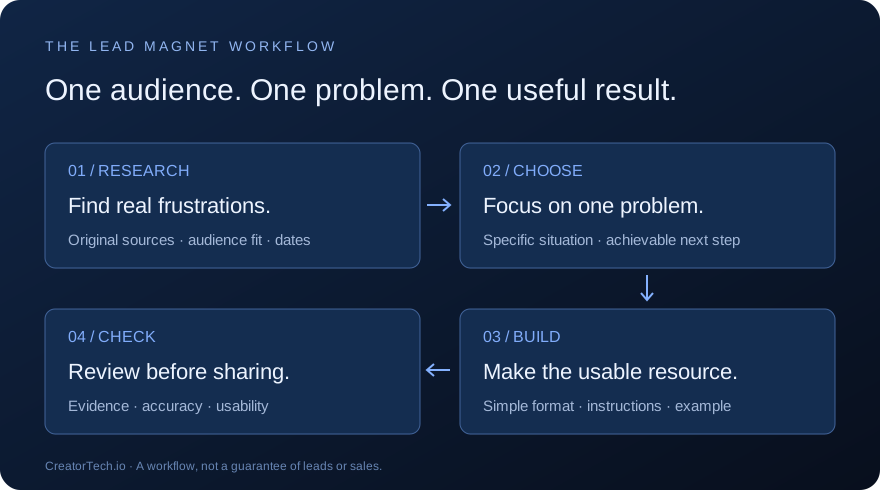
5. Ask for the finished resource, then check it
Make the deliverable explicit: a usable document or working tool, rather than an outline for one. Ask the AI to check the output and report what it actually tested.
Review the sources yourself. Check that the example makes sense, the instructions are clear and the resource works on a phone or prints cleanly. Test calculations and downloads where relevant.
In the Reel, I described a result produced in under three and a half minutes. That was one demonstration, not a turnaround guarantee. Research depth, tool access and review time will vary.
Try the prompt builder
The free CreatorTech builder turns your audience, offer, outcome and context into a structured prompt for this workflow. Copy it into an AI tool with web research and file creation available, then review what it produces.
The builder itself is free and generates a prompt. The AI service you use may have its own charges or usage limits.
Create your lead magnet prompt
Before sharing your resource: confirm it helps with one clear situation, check the evidence, remove unsupported promises and make the next step easy to follow.
This guide expands the workflow shown in my original Reel. It is written around capabilities rather than a particular model name so it remains useful as tools change.
BUILD ON THE IDEA
Join the conversation.
Share a question, a useful example or what you tried. Keep it constructive. Your display name and comment are visible to readers; your email is never shown.
No comments yet. Start the conversation.